Datasync RMS Retail POS Software Screenshots
Explore the Datasync RMS point of sale system in action. These real retail POS software screens show checkout, payment processing workflows, inventory control, multi-store inventory transfers, customer loyalty, delivery management, cash drawer accountability and point of sale reporting.
Discover more about our retail POS software features, point of sale pricing, and POS hardware options.
Retail POS & Point of Sale Checkout
Retail point of sale checkout, barcode scanning, split payments and age verification
Retail Point of Sale Checkout
Retail POS checkout screen with fast barcode scanning and front-counter sales workflows.

POS Split Payments
Split point of sale transactions across multiple supported payment types.

POS Age & ID Verification
Point of sale ID and age-verification workflow for age-restricted retail products.

POS Quick Inventory Add
Quickly attach a new UPC to an existing product or create a temporary new inventory item.

POS Customer-Facing Display
Customer-facing point of sale display and self-checkout view.
POS Delivery Management
Point of sale delivery customers, addresses, order assignments and history
POS Delivery Customer Setup
Create and manage customer records for point of sale delivery orders.

POS Delivery Address Assignment
Assign and manage customer addresses in the retail POS delivery workflow.
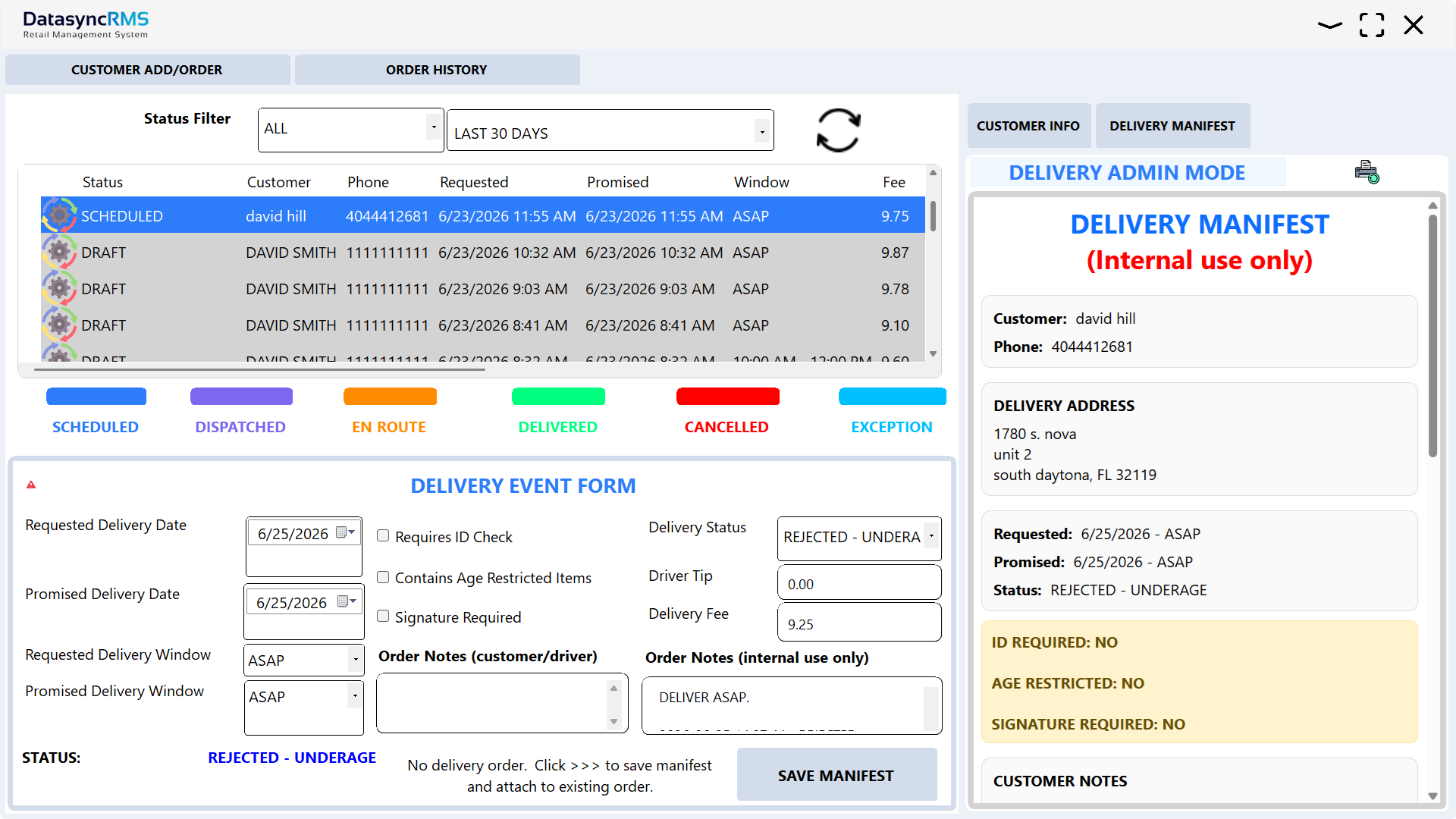
POS Delivery History & Assignment
View POS delivery history and manage active delivery assignments.
POS Cash Drawer & Register Management
Retail POS cash management, opening counts, closing counts and register accountability
POS Opening Cash Drawer Count
Count opening cash and prepare the POS register before sales begin.

POS Closing Cash Drawer Count
Reconcile retail POS cash drawer totals and closing shift counts.
Point of Sale Customer Loyalty
POS customer rewards, coupons and loyalty tools
POS Loyalty Administration
Configure customer rewards and point of sale loyalty settings.

POS Customer Loyalty Coupons
Create customer reward coupons for your POS loyalty program.

POS Customer Loyalty Screen
Customer-facing point of sale loyalty account and rewards experience.
POS Inventory Management
Retail POS inventory tracking, FIFO batches, pricing and promotions
POS Product & Inventory Management
Manage retail POS product records, UPCs, prices, quantities and stock levels.

FIFO POS Inventory Tracking
Review first-in, first-out inventory batches by UPC in the POS system.

POS Sales & Inventory Promotions
Set up retail point of sale promotions including bulk, percentage and fixed-price discounts.

POS Sales & Inventory Promotions
Screen for setting up the individual sale. Modern saas interface in your windows app. Or you can manage the sale on line in the website.
Multi-Store POS Inventory Transfers
Transfer point of sale inventory between stores or warehouses with FIFO-aware workflows
POS Inventory Transfer Menu
Create, review or continue multi-store inventory transfers within your point of sale software.

View Outgoing POS Inventory Transfers
Review outgoing retail inventory transfers or reopen a saved transfer draft.

Create POS Store Inventory Transfer
Start a new retail POS inventory transfer to another store location.

Receive POS Inventory Transfers
Scan incoming inventory, check quantities and save partial receiving progress for later.

View Received POS Inventory
Review and print previously received point of sale inventory transfers.
POS Event-Driven Camera Integration
Optional point of sale loss prevention camera integration captures configured POS events for review in the app or on the web. Requires an upgraded subscription.
POS Loss Prevention Camera Integration
Connect supported camera systems to POS activity for optional loss prevention review.

POS Loss Prevention Camera Integration
Name connected POS security cameras and configure defaults.

POS Camera Event Profile Setup
Choose point of sale events, camera sources and clip recording windows.

Review POS Camera Events & Screen Recordings
Review captured POS event clips and screen recordings in Datasync RMS or online.
POS Reports & Retail Sales Analytics
Point of sale sales reports, operational analytics and age-verification reporting. Samples from more than 60 available reports in five categories.
Retail POS Reports & Analytics
Monitor point of sale sales performance and retail business activity.

POS Age Verification Reports
Review employee age-verification activity and retail POS compliance-related statistics.

Monthly POS Sales Reports
Explore a detailed monthly point of sale sales report.
Retail POS Dashboard & Employee Management
Point of sale sales overview, store activity, secure employee login and access
POS Dashboard
View retail point of sale sales activity, transactions and store status.

POS Employee Login
Secure employee login with support for multiple active employees.