Smoke Shop POS Software
Built for Real Operators.
A point of sale system built from real smoke shop experience, designed for age-restricted products, fast-moving inventory, employee accountability, multi-store operations and the day-to-day realities of smoke, vape, tobacco and hemp retail.
DataSync RMS was shaped by actual smoke shop operations. We know what happens when new inventory arrives before setup is finished, when internet goes down during business, when age verification needs to be fast, and when managers need real accountability for drawers, inventory and employees.
Why this POS is different
- Real offline-capable storefront Local-first checkout and inventory workflows so your store does not stop working when the internet has a bad day.
- Built-in age verification Configure age-restricted categories, scan licenses and maintain reporting for employee activity and transactions.
- Inventory that matches the industry Categories, subcategories, UPCs, FIFO stock, variations, transfers and smoke-shop-specific product structure.
- Real accountability tools Blind drawer counts, discrepancy tracking, optional event video, reporting and multi-store standardization.
A POS Designed Around How Smoke Shops Actually Operate
A smoke shop POS needs to do more than ring up a product, calculate tax and print a receipt. The system has to help employees move quickly while giving owners and managers control over inventory, age verification, cash handling, product changes and store activity.
Whether you operate a single smoke shop, a growing vape store chain, a tobacco retailer or a hemp shop, the underlying problems are often the same: products change quickly, inventory can be difficult to standardize, restricted products require additional attention, and owners need visibility into what employees and stores are doing.
Fast Smoke Shop POS Checkout — Even When the Internet Is Down
DataSync RMS uses a local-first, cloud-synchronized design. The store does not suddenly become unusable simply because its internet connection goes down.
Most POS and inventory functions continue operating locally and synchronize with the cloud when connectivity returns.
What Happens to Checkout if the Internet Goes Down?
Cash and other payment types that do not require an online processor can continue to be used.
Credit card processing is different. No POS system can guarantee that a card transaction performed without authorization will eventually be approved. Some offline card systems store transaction information and attempt authorization after connectivity returns. If the card is later declined, the merchant may be responsible for that loss.
DataSync RMS instead allows the POS to switch to a manual card workflow. If your business maintains a separate backup terminal connected through another internet source or cellular connection, the payment can be processed there while the POS continues tracking the sale.
Sell a Product Before Inventory Setup Is Finished
Smoke shops can receive a large amount of new inventory very quickly. Sometimes customers are standing at the counter before every product has been entered.
If an employee scans an item that has not yet been added to inventory, DataSync RMS can create a temporary inventory record so the product can still be sold.
That record becomes available throughout the business, allowing the product information to be completed later without forcing the cashier to stop the sale.
Built-In Age Verification for Smoke Shops and Vape Stores
Age verification is not an unusual exception in a smoke shop. It is part of normal daily checkout.
DataSync RMS allows individual product categories to be configured as age restricted, including the minimum age required for that category.
For example, if a store configures a category with a minimum age of 21, scanning an item from that category triggers the age-verification workflow during checkout.
Driver License Scanning
DataSync RMS can use an inexpensive 2D PDF417 barcode scanner to read compatible driver-license barcodes instead of requiring costly proprietary age-verification equipment.
Category-Level Age Rules
Choose which categories require age verification and configure the required minimum age for each.
Manual Verification Fallback
Real stores need a fallback. Hardware can fail, and businesses encounter repeat customers. Authorized employees can manually confirm age when appropriate according to store policy and applicable law.
Age Verification Reports
DataSync RMS records age-verification activity and provides reports that can be reviewed by employee and transaction.
A manager can review orders handled by an employee and see the associated age-verification results. This creates a historical record that may be useful when investigating a complaint, employee behavior or a legal matter.
Optional Loss Prevention Video
Stores using the optional DataSync RMS loss-prevention camera integration can also review recorded video associated with supported POS events instead of searching through hours of DVR footage.
Smoke Shop Loyalty Rewards Without Creating Inventory Problems
DataSync RMS includes an optional customer loyalty system designed to be flexible.
Some loyalty systems are built around automatically giving away specific products. That can create inventory and accounting complications for a store carrying thousands of products and variations.
DataSync RMS can instead use customizable points and percentage-based rewards so the business can control how customers earn and redeem benefits.
Local Delivery Management for Smoke Shop Retailers
DataSync RMS includes a delivery module for businesses that provide local delivery.
Customer management, delivery addresses, delivery history and reporting are included. Drivers can update delivery manifest status remotely using a smartphone and the manifest QR code.
Cash Drawer Accountability Designed for Real Retail Stores
Whether you operate one smoke shop or fifty locations, a manager will not always be standing beside an employee when a drawer is opened or closed.
Assuming every discrepancy means theft is a mistake. Assuming every discrepancy is innocent is also a mistake. DataSync RMS is designed to give management enough information to determine what actually happened.
Use as Many Drawers as Your Store Needs
Each physical drawer can be labeled in DataSync RMS and its normal starting cash amount configured once.
A manager can assign a drawer to an employee, or an employee can assign an available drawer to themselves when permitted.
For unattended drawer assignments and counts, physical drawers should be kept in a secure location covered by the store's camera system.
Opening Drawer Count
Employee Logs In
If the employee is required to use a drawer, DataSync RMS prompts them to select an available drawer that is not already assigned.
The Employee Performs a Blind Count
The employee is not shown what the drawer should contain. They count each denomination and submit the result.
The System Compares It With the Previous Close
Each denomination is compared with the previous closing count for that exact drawer.
Incorrect Denominations Are Recounted
If a denomination does not match, the employee is asked to count that denomination again.
A Discrepancy Record Is Created
If the count still does not match, management can review who previously closed the drawer, when it was counted, the prior denomination counts and the new opening counts.
Example Drawer Discrepancy Report
A discrepancy can be reviewed on screen and a report can be printed for employee and manager review.
| Denomination | Previous Closing Count | Current Opening Count | Difference |
|---|---|---|---|
| Hundreds | $200.00 | $200.00 | $0.00 |
| Fifties | $100.00 | $100.00 | $0.00 |
| Twenties | $160.00 | $140.00 | -$20.00 |
| Tens | $50.00 | $50.00 | $0.00 |
| Fives | $50.00 | $45.00 | -$5.00 |
| Ones | $32.00 | $32.00 | $0.00 |
| Quarters | $10.00 | $10.00 | $0.00 |
| Dimes | $4.00 | $3.90 | -$0.10 |
| Nickels | $4.60 | $4.60 | $0.00 |
| Pennies | $0.25 | $0.25 | $0.00 |
Optional Camera Verification
When the optional loss-prevention camera system is enabled, management can review supported drawer-count video directly from DataSync RMS rather than manually searching the DVR for the correct time.
Closing Drawer Count
At the end of the employee's shift, the drawer is counted again using a blind count. The employee is not told what the expected total should be.
Management can then review the actual drawer count against expected figures, including payment-type information and discrepancies. A discrepancy form can also be printed and signed when store policy requires it.
Smoke Shop and Vape Shop Inventory Management
Inventory is one of the most difficult parts of operating a smoke shop, vape shop or hemp store, and it is also one of the most important parts to get right.
DataSync RMS inventory is organized around products, categories, subcategories, UPCs, primary product codes and product variations.
Start With a Smoke Shop Inventory Template
During initial setup, a business can select a smoke shop template containing common categories, subcategories and product attributes.
Attributes can include information such as puff count, series, nicotine level, strain and other characteristics commonly used by smoke and vape retailers.
These templates are only a starting point. Categories, subcategories and attributes can be changed, added or removed from the application or through the web portal.
Chain-Wide Product Standardization
Product information is standardized across the business. The same UPC can retain the same product name, manufacturer, description and variations at every location.
Each location still maintains its own inventory quantities. A store can also use different FIFO pricing when appropriate, allowing locations with different operating costs or markets to price inventory differently.
Whether the business has twenty UPCs or more than 150,000 UPCs, the inventory structure is designed to scale.
FIFO Inventory
DataSync RMS uses FIFO inventory tracking so inventory quantities and batches can be managed at the store level while maintaining standardized product information across the entire organization.
Three Practical Ways to Receive Inventory
Each Store Orders Its Own Inventory
An employee receives products through the guided inventory module.
If Store 007 enters a completely new product, the product definition becomes available throughout the organization. When Store 034 later receives the same product, much of the product setup already exists and the employee can focus on receiving the correct quantity.
One Store Acts as the Distributor
Products can be purchased through a primary location and inventory transfers created for the other stores.
Employees at receiving stores scan the shipment as it arrives. Transfer records help identify differences between what was sent and what was actually received.
Central Warehouse Distribution
A warehouse can use the same inventory-transfer process to send products to individual retail locations and maintain consistent inventory information throughout the chain.
Inventory Can Still Be Entered Offline
Inventory work can continue locally during an internet outage. Once connectivity returns, DataSync RMS can synchronize that information with the cloud.
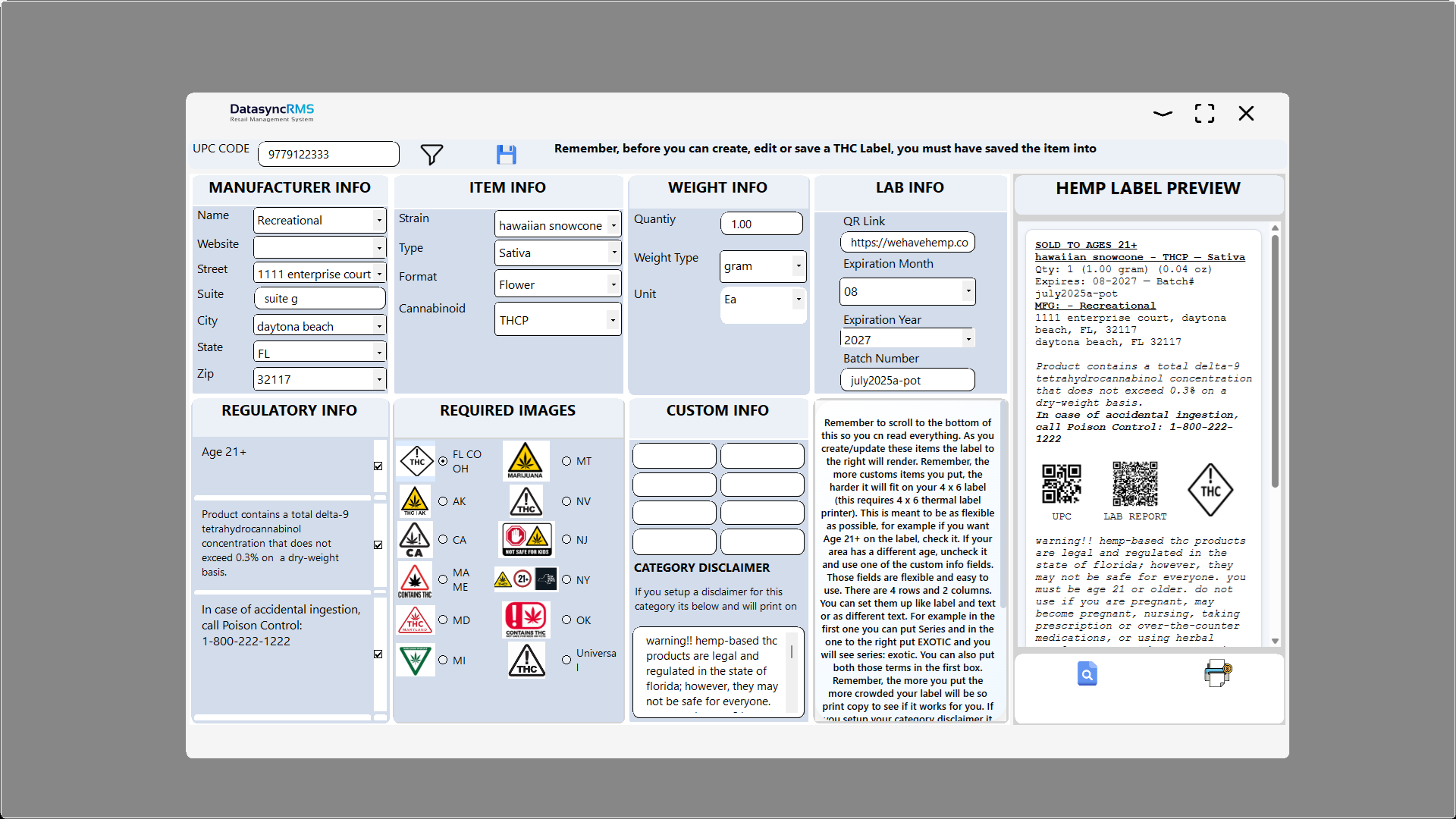
Optional Hemp and THC Product Label Printing
DataSync RMS also offers an optional label-printing module for businesses that sell applicable hemp or THC products.
After flower or individual pre-roll inventory has been configured, the store can create a reusable 4 × 6 product label.
During the sale workflow, the label can be printed for the appropriate package. This can support stores that weigh and package eligible products themselves rather than relying exclusively on prepackaged inventory.
The built-in label editor lets the store design or modify its label while seeing a live preview of the finished output. The preview reflects what will print during the sale.
Smoke Shop POS Reports That Go Beyond a Spreadsheet
DataSync RMS reports are available through the tenant web portal and can also be accessed from individual stores by employees with the appropriate permissions.
Instead of limiting owners to basic exported transaction spreadsheets, DataSync RMS provides visual reports and dashboards designed to help management understand what is happening inside the business.
Sales Reports
Review sales performance, transaction activity and trends.
Employee Reports
Review employee activity and performance.
Age Verification Reports
Review age-verification activity by transaction and employee.
Inventory Reports
Review stock, product activity and inventory movement.
Store Comparisons
Compare locations throughout a multi-store organization.
Loyalty & Performance
Review customer loyalty and other business performance metrics.
More than 50 reports are available across DataSync RMS, giving owners and managers detailed information without requiring them to build their own spreadsheets.
Why Real Smoke Shop Experience Matters
A software company can look at a smoke shop and see a cash register, products and customers.
An operator sees something very different.
You see the shipment that arrived before every SKU was entered. You see a line of customers while an employee is receiving inventory. You know scanners sometimes fail. You know managers cannot be present for every drawer count. You know the same disposable can arrive in dozens of variations. You know a new product introduced at one location may appear at another location a week later.
Those are the kinds of problems DataSync RMS was designed to solve.
Smoke Shop POS Software FAQ
What should I look for in a smoke shop POS system?
A smoke shop POS should handle age verification, high-volume UPC inventory, product variations, employee accountability, cash drawer controls, reporting and the inventory workflows used by tobacco, vape and hemp retailers.
Can DataSync RMS verify customer age?
Yes. Categories can be configured with minimum-age requirements and compatible driver-license barcodes can be scanned using supported 2D PDF417 barcode scanners.
Can a smoke shop POS work without internet?
DataSync RMS uses a local-first architecture, so many POS and inventory functions can continue when the internet is unavailable. Cloud synchronization resumes when connectivity returns. Services that inherently require internet access, such as normal online card authorization, still depend on connectivity.
Can DataSync RMS manage multiple smoke shop locations?
Yes. Product definitions can be standardized throughout the organization while each store maintains its own quantities and, when needed, location-specific FIFO pricing.
Does DataSync RMS support inventory transfers?
Yes. Inventory can be transferred between locations or distributed from a central store or warehouse. Receiving employees can scan incoming products and review discrepancies between shipped and received quantities.
Does DataSync RMS support vape shop inventory?
Yes. The inventory structure supports categories, subcategories, UPCs, product codes and variations such as series, puff count, nicotine level and other attributes commonly used by vape and smoke shops.
Is DataSync RMS only for smoke shops?
No. DataSync RMS is a broader retail management and point of sale platform, but many of its workflows were developed from firsthand experience operating a smoke shop and dealing with the unique inventory, employee and age-restricted product challenges in this industry.
See What a Smoke Shop POS Built by a Smoke Shop Operator Looks Like
Explore DataSync RMS screenshots, compare plans or start setting up your store. You should be able to understand how your POS works before committing your business to it.
View Screenshots Plans & Pricing Start Free Trial